Item component
Items are a generic term for interactive objects that can be placed in the world. The Item component is the basis for things like MovableItem and GrabbableItem.
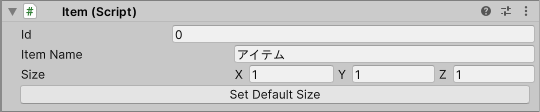
property
| property | function |
|---|---|
| Id | A value that is automatically set to identify the item. |
| Item Name | Item name. Appears to the player when grabbed, etc. If empty, the default value will be displayed. |
| Size | The size of the area that the item mainly occupies. Each element is specified as an integer. Assume that the area occupied by this item is a cuboid whose size is this value and whose center of the base is the item’s origin. (This area affects things such as the placement of items in WorldCraft. It doesn’t matter if the actual size of the item exceeds this area.) You can check this area with Gizmo. Size can be automatically set by pressing the Set Default Size button. As of 8/16/2022, this value is only used for craft items. |
| Item Tags | A list of item tags the item declares. Used by some script APIs (such as getItemsNear and raycast) to filter target items. One item can declare up to 32 item tags. Each item tag must be 64 characters or less, and can only contain alphanumeric characters and some symbols (apostrophe, comma, hyphen, period, underscore). The same item tag cannot be declared more than once. Empty item tags cannot be declared. |
| Movement Type | Specifies how the synced position and rotation of the item and its SubNodes are interpolated when reflected on other players’ screens. See below for details. |
An item’s child GameObjects cannot be further items.
Movement Type details
Movement Type can be either Legacy or Smooth.
| Movement Type | Behavior when reflected on other players’ screens |
|---|---|
| Legacy | Interpolation and immediate reflection are switched automatically depending on the movement. |
| Smooth | Movements declared as warps are reflected immediately, and other movements are interpolated. |
The initial value of Movement Type is Smooth. The Movement Type of craft items and items in worlds uploaded in the past is treated as Legacy until they are re-uploaded.
On the owner’s device, movements are reflected as follows.
- Movements of the item itself are always reflected immediately regardless of the Movement Type setting.
- Movements of SubNodes follow the Movement Type setting even on the owner’s device.
The Movement Type setting is not reflected in previews in the Unity Editor.